Author Topic: Best Of UP's N Scale Canyon Division Layout Build....  (Read 27634 times)

0 Members and 1 Guest are viewing this topic.

Stolen Moment

  • Crew
  • *
  • Posts: 49
  • Respect: +17
Re: UP's N Scale Canyon Division Layout Build....
« Reply #165 on: June 07, 2026, 04:45:31 PM »
+1
Thanks!  I have been wondering how all the scenes you've been showing us fit together.

Sumner

  • Crew
  • *
  • Posts: 889
  • Gender: Male
  • Respect: +2485
    • My Home Pages....
Re: UP's N Scale Canyon Division Layout Build....
« Reply #166 on: June 29, 2026, 06:18:13 PM »
+3
Upper Level Track -- Pt. 1

With all of the major scenery in place it is time to lay the upper level track. After that will move to the lower level.


I felt from the beginning that the section of track show above was going to be the hardest track to lay due to it being on the upper level with a long reach in. Further complicating this is that two turnouts need to be installed near the middle of the scene. I didn't see an easy way around it if I wanted the scene to look like it does so got with it. It took about 2 1/2 days to get this track and the two turnouts in (not full days...4 hrs. per day).


Making one's turnouts and using servos can go a long ways to decreasing cost, especially if you need a lot. I can have a turnout and turnout control for about half of what a commercial turnout costs alone. More info on the low cost, easy to do, (no Arduino) turnout control ( HERE ).


One section of scenery was removed above to help with the mounting of the servos for the two turnouts. The tunnel sections were also remove to make track laying easier.


I came up with a new servo bracket this past year and use it almost all of the time now. It is very easy to install. Put the turnout in place (temporarily) .... drill a small diameter hole down into the layout through the throwbar hole.....enlarge that hole from the bottom to 3/8 inch.....put the servo mount up in that hole......and drive one screw to hold the bracket/servo. You can do most of this from the side of the layout. In this case I only went under to drive the screw in.

The wire to the throwbar will be perfectly centered in the throwbar hole. A huge plus if you have ever tried to install servos.

More info on these brackets and a video to show how easy it is to use them....

Self-centering servo mounts....... https://1fatgmc.com/RailRoad/Trackwork/page-46b.html

Servo mount install video...........


I had a ladder on each side of the layout and was on one or the other for most of this. I could also kneel on the layout top, bottom right above.


I caulked the track down with a very small bead of DAP Dynaflex 230 and spread that flat with my finger. Put the ME code 55 in place and pinned it down. Micro Engineering flex track is very easy to work with and will hold any curvature you put in it with the simple tool ( HERE ).

The track here will cross the trestle ..... run to and past the sawmill on the other side of the divider and then recross the trestle. Appears to be a two track mainline on the trestle but is actually a 'dog-bone' run of track with the trestle representing two different scenes.


Got the track laid and turned out to not be as bad a job as I thought it would be.


Still need to solder some track drops to the track and take them to the perimeter bus on the side of the layout.


The layout will have 8 power districts all powered by a DCC-EX command station with 8 track outputs. Any of them can be switched at any time with the throttle to be DCC Main, DCC program, DCC Auto-reversing and/or DC and DC reverse polarity. There will be one district than will be DCC only most all of the time. I'll be able to switch the other 7 to DCC or DC at any time so I can run both types of engines on the layout.


There will be a short section of track (siding) where helper engines can cut off the train and sit until they are needed or return to the lower level.

To be continued and a link to this whole build ( HERE ).

Sumner
Working in N Scale ---Modeling UP from late 40's to early 70's very loosely......

Under$8.00 Servo turnout Control --- 3D Printed Model RR Objects -- My Home Page

http://1fatgmc.com/RailRoad/RR Main/Link Page Menu.html

John

  • Administrator
  • Crew
  • *****
  • Posts: 14010
  • Respect: +4187
Re: UP's N Scale Canyon Division Layout Build....
« Reply #167 on: June 29, 2026, 07:09:59 PM »
+1
The hills turned out really nice .. I was wondering how you would tone down the red .. i think it mixed nicely with the other colors

Sumner

  • Crew
  • *
  • Posts: 889
  • Gender: Male
  • Respect: +2485
    • My Home Pages....
Re: UP's N Scale Canyon Division Layout Build....
« Reply #168 on: July 21, 2026, 11:02:02 AM »
+1
Ed has been coming in 4-5 days a week for months now helping with the layout. He wanted to try making turnouts as all the turnouts on the layout up to this point I've made and we need a lot more so I was more than happy this. I got him started with a ....


.... #6 Fast Tracks code 55 fixture. It didn't take too long for him to get the hang of it using the fixture. Next he wanted to move on to making a turnout using a paper template. There are going to be two cross-overs on the main that are a fair ways apart and the decision was made to make some #8's for the cross-overs (bottom above). I had made some 8's, 10's and 12 curved turnouts but never straight. I can't believe how much prettier these are vs. the #6's. If I had know this I might of tried to work them in more places on the track plan. They are pretty but use up more real estate.

I have a fair amount of info on building turnouts, cutting your own PCB ties and other info ( HERE ).

To be continued and a link to this whole build ( HERE ) .

Sumner
Working in N Scale ---Modeling UP from late 40's to early 70's very loosely......

Under$8.00 Servo turnout Control --- 3D Printed Model RR Objects -- My Home Page

http://1fatgmc.com/RailRoad/RR Main/Link Page Menu.html

Sumner

  • Crew
  • *
  • Posts: 889
  • Gender: Male
  • Respect: +2485
    • My Home Pages....
Re: UP's N Scale Canyon Division Layout Build....
« Reply #169 on: July 28, 2026, 02:09:13 PM »
+1
A District (DCC or DC) Control Panel....

I'm using an 8 district DCC-EX command station (Districts A to H) that was under $200 to build. It allows any district to be DCC, DCC Program or DC at any time. There is a 2 track main that circles the whole layout (24' X 6'). One half of the main (2 tracks) is District A. The control box below allows either the inner main track or the outer track to be turned on or off at any time.

District A's two tracks can be DCC or DC at any time. I could run a DCC loco on one of the tracks (inner or outer) and a DC loco on the other but not at the same time. I can run a DCC loco on one of the tracks and then turn the power to that track off. Turn the power to the other track on and change that track to DC and run a DC train on that track with the same throttle. DCC-EX has no problem doing any of this using your throttle.

This control panel does two things. One is that it controls the power to either track (on/off). The second is that if a DC or DCC engine is on one of the tracks and the power is turned off you can throw a switch for that track that will turn on a LED to indicate if there is a DCC or DC loco parked on that track (ask if you have questions about this).

The following images will show the build of the panel and where it will be placed. The build time was probably about 6-8 hours which includes the design time using Fusion. Cost about $10.


.


.


.


.


.


.


.


.


.


If you see this on a forum ask questions or email me at contactsumner1 (at) gmail (dot) com.

To be continued and a link to this whole build ( HERE ) .

Sumner
Working in N Scale ---Modeling UP from late 40's to early 70's very loosely......

Under$8.00 Servo turnout Control --- 3D Printed Model RR Objects -- My Home Page

http://1fatgmc.com/RailRoad/RR Main/Link Page Menu.html

Sumner

  • Crew
  • *
  • Posts: 889
  • Gender: Male
  • Respect: +2485
    • My Home Pages....
Re: UP's N Scale Canyon Division Layout Build....
« Reply #170 on: September 12, 2026, 10:44:30 AM »
+1
Been doing a bunch of rewiring of the 8 power districts to take advantage of being able to run DCC and DC in them with the DCC-EX command station.  Basically done with that so I can go back to laying track and will have the buses in place to wire the track drops to.  Here is an update video....


Sumner
Working in N Scale ---Modeling UP from late 40's to early 70's very loosely......

Under$8.00 Servo turnout Control --- 3D Printed Model RR Objects -- My Home Page

http://1fatgmc.com/RailRoad/RR Main/Link Page Menu.html

Sumner

  • Crew
  • *
  • Posts: 889
  • Gender: Male
  • Respect: +2485
    • My Home Pages....
Re: UP's N Scale Canyon Division Layout Build....
« Reply #171 on: September 16, 2026, 12:59:51 PM »
+2
Major DCC-EX Bus Rewire....

The following is going to be pretty dry/boring to most I'm sure but will help me down the road if I forget some of what I've done. The site helps me a lot with that.

The layout was originally set up to have 8 power districts and I wired the main perimeter bus with that in mind and used Tam Valley Boosters and circuit breakers. I only had track in a couple of those districts but tested all 8 districts and the Tam Valley components worked well.

I then decided that I really should get the major part of the scenery finished since I didn't want to be working over track and putting scenery in so laying track and connecting to it pretty much came to a halt for a longer time than I anticipated.

During that time the DCC-EX crew made a huge addition to DCC-EX. The ability of the command station to produce up to 8 track outputs that can be either DCC or DC (also Program). Any of the districts can be either DCC or DC at any time and it is really easy to change them with the Android app EngineDriver. You can be running DC in one or more districts and DCC in the other or Programming a loco in one all at the same time.

I've tried to buy or build all the diesel engines UP had from the 40's to the mid '70's that have been made in N scale. There are a lot, right around 70. Most all of the ones I bought were made in the '70's, 80's, 90's and after 2000. Most were never offered in DCC. I've converted about 30% of what I have to DCC, mainly with $16 to $30 decoders. I bought a lot of them more to look at them than to run them. Now with DC available with DCC-EX I don't need to convert lots of them to DCC which is a huge savings in time and money.

To take advantage of what the command station can do I decided to break the 8 districts up differently and now could sell the Tam Valley components if I want as I don't need them any longer.
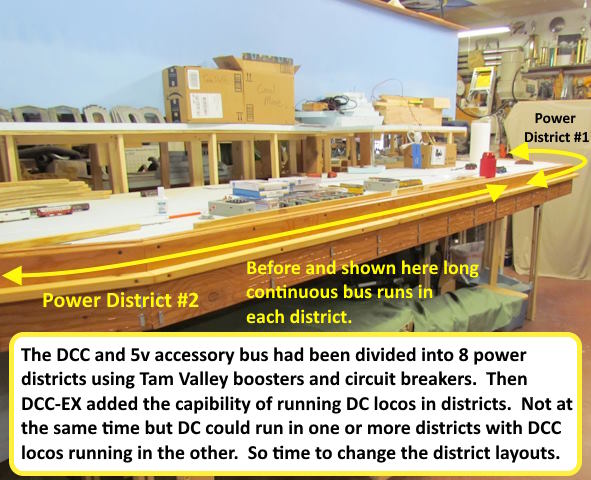


Previously the bus segments were lone with one after the other. To take advantage of what DCC-EX can do I ended up with new districts near to each other that needed the track drops to go to different buses.
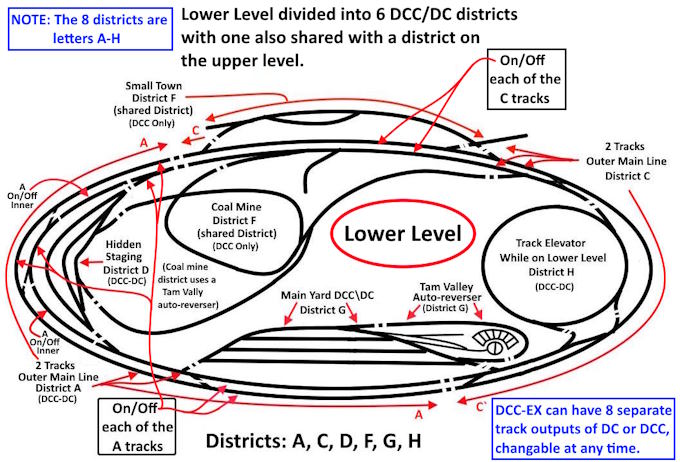
 

Above district A is for the two track main (same with district C at the top). I set those up so DCC or DC trains could lap the lower level or be parked on one or the other main line tracks and then have the track power turned off for that track. Then the district could be changed to DC or DCC depending on the situation and a train run on the other main track. Keep in mind you can change the districts in seconds with your throttle.

Notice above district G (8 districts are A-H) is the main yard and maybe a DCC loco is working it while a DC loco is lapping the lower level with a DCC train parked with the power off on the other main track. I need to get track drops from G and A to the bus on the side of the layout so it has to be cut into sections so that the track drops don't have far to go.
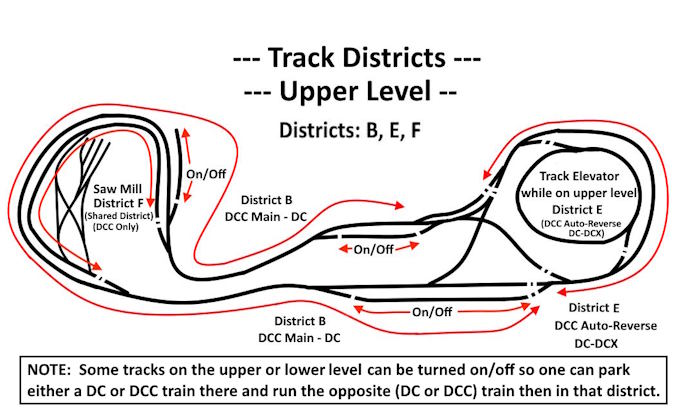
 

The upper level is mostly two districts (B and E) and some of both have sidings where a DCC or DC train can be parked. The whole E district on the right is a reversing section if you use the 'X' cross-over from on side of the layout to the other. In DCC mode the E district can be changed to DCC Auto-Reverse (another DCC-EX feature) and that will automatically do the reversing. If that cross over is used in the DC mode you can use the DC-DCX mode that change the polarity of either district B or E while the train is in the other district. They are both large with the layout being 24 feet long.

The sawmill area will be District F which also powers the coal mine complex tracks on the lower level a the track for a small town there also. Again is is so DC trains can be running most of the rest of the layout while DCC ones are working or running in other areas.
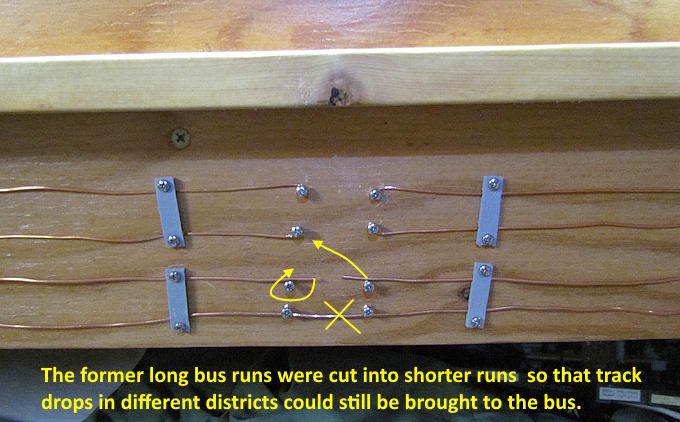
 

To break up the previous long bus runs I cut the wires (above) and put in new screws and wrapped the wires around them.
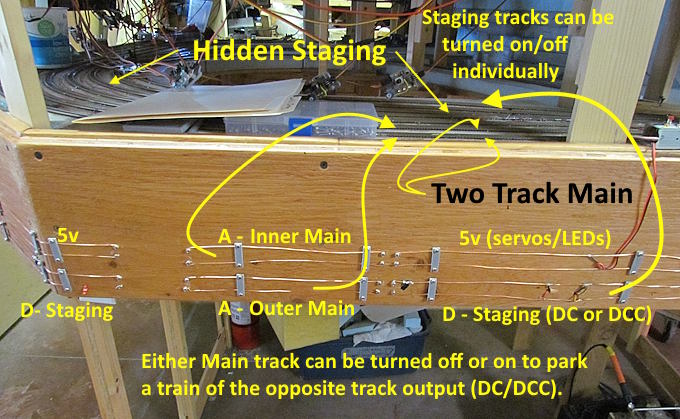
 

Above one can see how the bus was broken up in the area above. Top wires on the right and left are 5v for servos and LEDs. Bottom wires on the right and left are for track drops for the hidden staging area track. Those tracks can be individually turned on/off so that DC and DCC trains can be staged there.

The middle wires are for track drop for the inner or outer 2 main tracks. Either can be turned on off with a panel out of view.
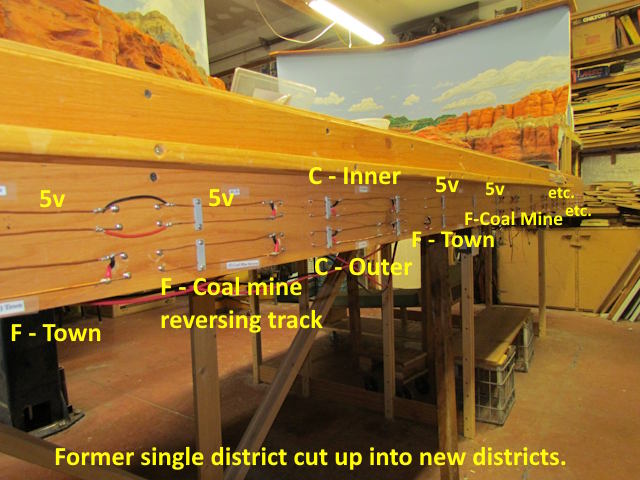
 

The south side bus was also broke up into a number of sections to handle the various districts and 2 main line tracks there along with 5v power for the turnout servos and LEDs. No track drop has to be longer than about 5 feet to reach a bus section for them.
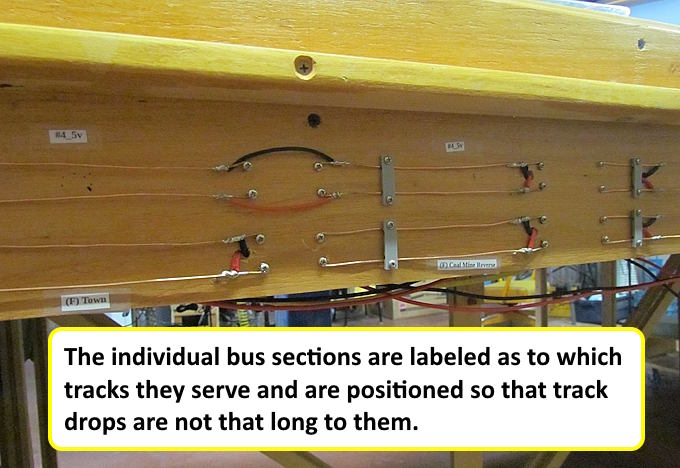
 

Bus is label so I know where to run the track drops as I lay track. An operator doesn't need to know any of this just which district they are running in.
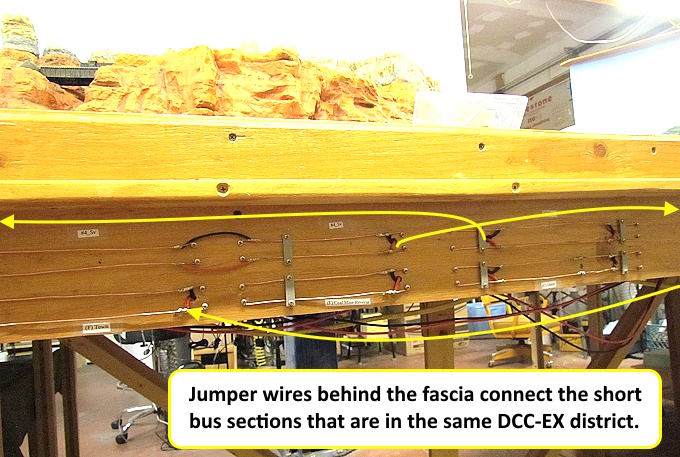
 

Most of the new short districts repeat every 6 feet or so and are connected with jumpers to each other and then back to the command station.
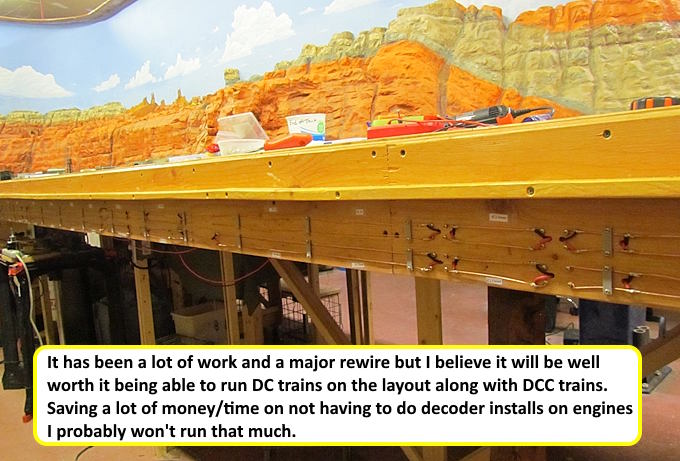
 

I got all the wiring in for track drops so now can go back to laying track any place on the lay and have someplace to connect it to so the track can be tested as it is laid.
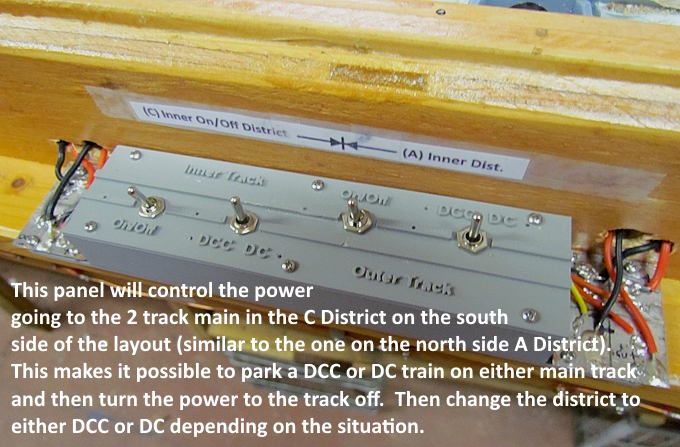
 

Another control panel was made to control the 2 track main that runs in the C district on the south side of the layout.

To be continued and a link to this whole build ( HERE ) .

Sumner
Working in N Scale ---Modeling UP from late 40's to early 70's very loosely......

Under$8.00 Servo turnout Control --- 3D Printed Model RR Objects -- My Home Page

http://1fatgmc.com/RailRoad/RR Main/Link Page Menu.html

Sumner

  • Crew
  • *
  • Posts: 889
  • Gender: Male
  • Respect: +2485
    • My Home Pages....
Re: UP's N Scale Canyon Division Layout Build....
« Reply #172 on: September 28, 2026, 01:44:48 PM »
0
DCC-EX 8 District (A-H) Control Panel ....

Track outputs on a DCC-EX command station can be powered off with your phone or other throttle or by turning the command station off. I wanted a physical way to turn any of my track outputs in addition to those options. I have an 8 track output command station and came up with the following on/off boxes with an indicator light on each along with a letter representing which output that it is. DCC-EX uses letters instead of number to label the outputs, A-H in my case.

If you need more info that what is in the images please ask.


The individual control box was designed so that you could put two screws through holes in the base and screw them into the wood rub-rail that goes around the layout (see last images below).


With the base screwed down the main box section and top slid onto it and a single screw in the front and into the base secures the upper housing.


I used my .......


......$65 hot air station (more info ( HERE ) .......


...... to solder the small 1206 SMD resistors for the LED's in a minute or less.


0402 red LEDs were dropped into the holes on the intermediate top and glued in place with CA.


..... a hole was drilled in the fascia behind each box for the three sets of wires. The track voltage went to the bus used for track in 8 different districts.


Red indicator LEDs are lit when the track output is on.


The eight track outputs from the DCC-EX command station go to one of the 8 boxes (A-H) and then on to 8 different districts on the layout.

To be continued and a link to this whole build ( HERE ) .

Sumner
Working in N Scale ---Modeling UP from late 40's to early 70's very loosely......

Under$8.00 Servo turnout Control --- 3D Printed Model RR Objects -- My Home Page

http://1fatgmc.com/RailRoad/RR Main/Link Page Menu.html

Sumner

  • Crew
  • *
  • Posts: 889
  • Gender: Male
  • Respect: +2485
    • My Home Pages....
Re: UP's N Scale Canyon Division Layout Build....
« Reply #173 on: October 09, 2026, 11:11:17 AM »
+2
One aspect of making hand-laid turnouts that I've never liked is adding ties to the turnouts and painting them. Fast Track does make what they call QuickSticks. They are nice and will work with turnouts as long as the turnout matches where the PCB ties are on their templates or fixtures.

The drawback for me is they are $11 at the moment and I need 70-90. I can build a turnout with PCB ties I cut, their ME code 55 rail and separate wood ties for under $5 each. Add in the price of the QuickSticks and deduct for the individual wood ties and the cost is around $14 per turnout. If you are only making a few turnouts consider the QuickSticks. For me the cost of $4-$5 per turnout vs. $14-$15 per turnout is huge with needing ties for 70-90 turnouts.

Since I was gluing individual ties to turnouts and that could take 45-50 minutes per turnout I looked for another alternative. I moved to designing tie strips with Fusion and printing them with my BamBu A1 filament printer. Now this for sure isn't for everyone but it is going to be a big help to me and cost less than what I'm spending on individual tie resulting in a cost of about $4 per turnout.

I can paint the tie strips in seconds and install them to the turnout or the layout under it quickly..


It Didn't take too much time to come up with a design using Fusion for #6 LH & RH tie strips (make one and mirror it and you have the other).


I printed some of the #6's and also designed some for a couple of #8 crossovers that Ed had made. This worked well except for occasionally during the printing process the print would detach from the build plate and be ruined. The problem was there wasn't much contact area between the print and the build plate, which you need, and if one tie lifted off the build plate the printhead would snag it and pull the print off the build plate. Some of the problem is the speed that the A1 print head is moving at during a print as it is a very fast printer.


It was easy and fast to print the tie strips with the camouflage paint above. Fast Tracks recommended it and it matches the ties on the ME code 55 flex track I'm using well.


Above is an image of the first tie strips that were printed and painted. The turnouts still need to be painted.


To deal with the build plate adhesion problem I added a very thin print layer between the rails. That gave the print more adhesion to the build plate and no more printing problems and it only added 1-2 minutes per print.


I started designing tie strips for curved and other turnouts. I would take about 50-60 minutes to do this per turnout. About as much time as gluing ties on but I like the results better and would rather be at the computer than gluing and re-gluing ties that fell off to the turnout.


A negative was after spraying the ties with the camouflage paint I needed to paint between the ties to hide the dark paint there. Ballast would do the same but I might never make it to the ballast stage. Someone posted about painting fine detail with eyeliner brushes so I bought 100 for $7 and do I ever love them. It was easy to paint the bottom area between the ties and I'll be using these for a lot of my fine detail painting now. At 7 cents per brush (and they clean easily or throw them away) they are as good or better than brushes I've paid $7 or more per brush.


Above is an example of turnout combinations that were printed with the center section.


After some thought, should of thought of this sooner, I decided to slow the print speed down and also the acceleration rate down for the first layer. This is easy to do with the Bambu slicer program. This really helped with the adhesion problem and I can now go back to no center section. It only increased print time by a couple minutes and ........


.... now I'll be able to paint the ties in seconds with the spray can. This is going to a be huge savings of time and money for all the remaining turnouts that will be used on the layout. Cost per tie strip is well under a dollar per turnout and using the tie strips is way faster than gluing individual ties to a turnout.

Here is a link to the above on my site if you want to bookmark it ( https://1fatgmc.com/RailRoad/Trackwork/page-60.html ) .

Sumner
Working in N Scale ---Modeling UP from late 40's to early 70's very loosely......

Under$8.00 Servo turnout Control --- 3D Printed Model RR Objects -- My Home Page

http://1fatgmc.com/RailRoad/RR Main/Link Page Menu.html

Sumner

  • Crew
  • *
  • Posts: 889
  • Gender: Male
  • Respect: +2485
    • My Home Pages....
Re: UP's N Scale Canyon Division Layout Build....
« Reply #174 on: October 10, 2026, 07:42:21 PM »
+1
Track Elevator Control Panel.....

The layout has a lower and upper level with 10 1/4" between the levels.


There is a track elevator that can take a 12 foot N scale train between the two levels in under 10 seconds. I decided on this approach over a helix mainly for the length of time it takes a train to go from one level to the other. It also uses a lot less track so savings there but with the cost of the materials and the $7 winch the cost is probably a wash.

A 12 foot long train will probably let me take a 20-25 coal train with 3 engines between the lower and upper level and back down again. There will be run-around tracks at the upper and lower levels so that trains can run continuously on either level. Using a DCC-EX command station I'll be able to run DCC or DC trains on either level or on the elevator.


For a demo on how the elevator works click ( HERE ). You can find more info on building the elevator ( HERE ) and ( HERE ).


When the elevator is down it is connect to DCC-EX district H (8 districts A-H).


When the elevator is up it is connect to DCC-EX district E (8 districts A-H).


The bottom and top were designed with the 'free' version of Fusion by modifying an other case that had already been done.


Using solder pads makes things pretty easy when it comes to soldering a lot of connections in a small space. Not sure how one would do this with most commercial options.


.


DCC (either from the E or H District comes in at the top and goes out at the top to the track on the elevator. It can be turned on/off with a switch on the panel. The other 3 toggle switches and push buttons control the 3 turnouts on the elevator. Servo cables go from the left side of the panel to 3 $2 servo controllers and on to $3 servos which will throw the turnout. Very easy to wire and there are no computers or Arduinos or other electronics involved in throwing the turnouts. All for around $10 per turnout. More info ( HERE ).


The elevator is easy to operate with the hand control that came with it.

Here is a video on how the control panel works .....


To be continued and a link to this whole build ( HERE ) .

Sumner
« Last Edit: October 10, 2026, 07:45:24 PM by Sumner »
Working in N Scale ---Modeling UP from late 40's to early 70's very loosely......

Under$8.00 Servo turnout Control --- 3D Printed Model RR Objects -- My Home Page

http://1fatgmc.com/RailRoad/RR Main/Link Page Menu.html

Sumner

  • Crew
  • *
  • Posts: 889
  • Gender: Male
  • Respect: +2485
    • My Home Pages....
Re: UP's N Scale Canyon Division Layout Build....
« Reply #175 on: October 12, 2026, 12:46:59 PM »
0
Upper Level Control Panel....

I needed a .....


...... control panel to control the turnouts (1-6) and the crossing in the area outlined by the dotted red line above. I also wanted it to work with DCC and DC. The polarity on the 6 turnouts is controlled by a limit switch on the servo brackets (I have an number of options for the servo brackets on my website ( HERE ) that you can print. I've also in the sawmill yard controlled the polarity on the crossings frogs with a second set of limit switches on the servo bracket. This works if there is only one approach to the crossing from either direction.

This isn't the case above so I added a 3PDT switch to the panel to control the crossing. One pole is for the routed selected through the crossing LEDs and the other two poles handle the frog polarities to match the route selected.

If you throw turnout #1 above turnout #2 also throws and you use the crossing toggle switch to match the route. The same happens if you throw turnout #3 turnout #4 throws. The reason this works is that there is no place to park a train going or coming from the crossing on either route so the train will have to proceed past the second turnout.

Turnout #5 (to a passing siding) and turnout #6 to the track elevator or the run-around track throw independently of any other turnout.


Above the mountains/tunnels have been removed to lay and wire track.


I use 0402 pre-wired LED's (cheap per LED) for the indicator lights. They are placed just into the holes in the 3D print and glued with CA. I usually let it sit overnight at this stage.


Two of the toggle switches above throw two turnouts at the same time and control the route LEDs also. You throw the toggle and the route LEDs will light up and push the button switch and the turnouts throw.


A number of resistors were needed for all the additional LEDs that would be activated when you throw a switch. The answer was a long solder pad (easy to make in a few minutes) and 1206 3K resistors that were soldered on with the $65 hot air solder station.


The LED wires were soldered on first followed by the larger dia. wire. I could use 30 gauge for the larger wire but 26 gauge is easier to work with so usually use it..


Lots of soldering joints. Couldn't get all of this in this size panel without the solder pads (probably).


More info on controlling servos this way ($10 for all the parts per turnout) ( HERE ).


The elevator is just to the left of the Elevator Track Panel and the track the Upper Level Control Panel controls is just to the right of that panel.


Above two red LEDs are lit showing which route the crossing polarity is set for. Since none of the turnouts are set to use it the toggle switch should be set to the center 'off' position and no lights would be lit.

To be continued and a link to this whole build ( HERE ) .

Sumner
Working in N Scale ---Modeling UP from late 40's to early 70's very loosely......

Under$8.00 Servo turnout Control --- 3D Printed Model RR Objects -- My Home Page

http://1fatgmc.com/RailRoad/RR Main/Link Page Menu.html

Sumner

  • Crew
  • *
  • Posts: 889
  • Gender: Male
  • Respect: +2485
    • My Home Pages....
Re: UP's N Scale Canyon Division Layout Build....
« Reply #176 on: October 16, 2026, 02:19:34 PM »
0
7 Turnouts & 2 Crossings Control Panel.....

Just another control panel.  I needed a .....


...... control panel to control the 7 turnouts shown above and the frogs on the two crossings. Images below should tell the story but ask if you have any questions.


.


The resistors shown above are all 3k ohms. If all of the LEDs connected to them were lit at the same time (they aren't) with the 5v power the total amperage draw would only be 3 ma (.03 of an amp). As you can see in the images below you don't need to power a LED with the maximum usually rated power of 20 ma. If the 18 above were powered at that level they would draw .36 amps vs 3 ma total. .36 amps isn't much but when you have lots of LEDs on the layout it adds up.


One can make solder pads (above) dirt cheap with a number of PCB blank boards for under $10 on the internet. I cut them with tin snips and make the isolation cuts with a small triangle file. Goes quick.


.


.


.


.


.


There are still quite a few control panels that need to be made.

To be continued and a link to this whole build ( HERE )
.

Sumner
Working in N Scale ---Modeling UP from late 40's to early 70's very loosely......

Under$8.00 Servo turnout Control --- 3D Printed Model RR Objects -- My Home Page

http://1fatgmc.com/RailRoad/RR Main/Link Page Menu.html

Sumner

  • Crew
  • *
  • Posts: 889
  • Gender: Male
  • Respect: +2485
    • My Home Pages....
Re: UP's N Scale Canyon Division Layout Build....
« Reply #177 on: October 19, 2026, 08:29:08 PM »
0
Upper Level Track -- Pt. 2....

Moving along installing control panels for the upper level and also laying more track.


.


.


.


The video above shows how the panel works and also explains a little about the $2 servo controllers.


.


More info and images on the endoscope and print files for the camera end ( HERE ) .


.

 
.


.


To be continued and a link to this whole build ( HERE )
.

Sumner
Working in N Scale ---Modeling UP from late 40's to early 70's very loosely......

Under$8.00 Servo turnout Control --- 3D Printed Model RR Objects -- My Home Page

http://1fatgmc.com/RailRoad/RR Main/Link Page Menu.html