Peter put in some time on a new feature. Since he doesn't have a keyboard I tested in Utah while he programmed in Australia and posted new code for me to test.
Another coming feature is the ability to use the two encoders on the throttle for different increasing and decreasing speeds. One encoder can be set for fewer speed step increases (finer speed control) when turning the encoder click to click. The other can have larger speed changes click to click for running on the main.
To do this you use the ....
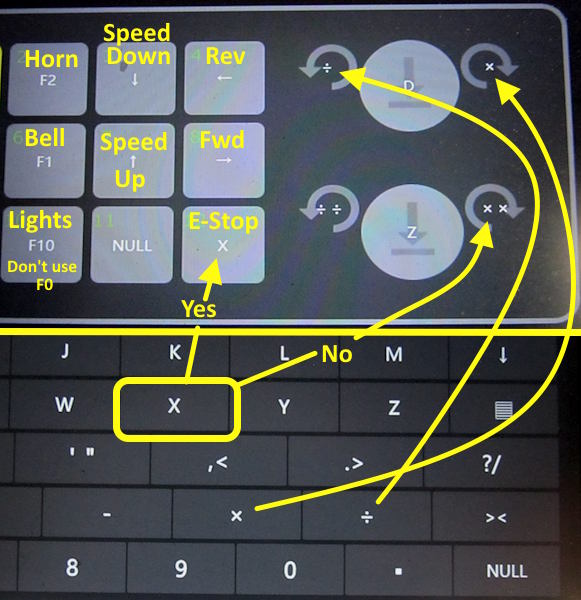
..... multiplier times symbol x at the bottom and division symbol not the normal x up the keyboard.
Above is a demo of how the two encoders work.
If in your main EngineDriver preferences and the "Gamepad/USB Preferences" you have the value 2 in "Speed button Change Amount" each button press on the speed buttons or each click on the encoder above will increase or decrease the speed by 2 speed steps. The bottom encoder above has two multiplier and division symbols programmed in. Since there are 2 of each the speed will increase or decrease by 4 speed steps ( 2 X the value of 2 that was programmed in the preferences).
Programming the two encoders like above or to a different value will give you finer speed control in one instance and courser (more speed steps per click) when that is a better option.
The above will be in the next 'beta' release of EngineDriver. In addition to the above commands Peter and Steve are adding features to EngineDriver all of the time so keep updating the software. Join the 'beta program'
( HERE ) to download the newest options like mentioned above. If you wait they will be in the Play Store options later.
You can also find this info on my site here....
https://1fatgmc.com/RailRoad/DCC/page-100.htmlSumner


