Author Topic: DC/DCC Demo Using EngineDriver/TrackManager  (Read 276 times)

0 Members and 1 Guest are viewing this topic.

Sumner

  • Crew
  • *
  • Posts: 875
  • Gender: Male
  • Respect: +2456
    • My Home Pages....
DC/DCC Demo Using EngineDriver/TrackManager
« on: September 30, 2026, 12:50:15 PM »
0
This is a scenario using a DCC-EX CSB1/8874 command station (around $200).  The command station has 4 track outputs (A, B, C, D), any of which can be changed to DCC, DC or Program at any time with a throttle and other means.  In the following case there is a layout dispatcher controlling those options with a phone running the EngineDriver app and he has selected the 'Track Mgr' option.

There are no electrical switches involved that the dispatcher has to operate other than possibly ones to turn the power on and off to sidings that engines/trains are waiting in. This allows one to easily change track outputs (A, B, C, D) between DCC and DC on the fly with only a phone.

The throttles used below are all wireless handheld phone, tablet, game controller or commercial or DIY WiThrottle WiFi throttles. This is big for DC operators to be able to use these throttles to control their DC locos. They are no longer tied to a fixed throttle.

For this demo there will be an outer loop around the layout that has been broken up into 4 districts with isolation gaps cut in the rails.  The four track outputs on the command station go to each of the 4 districts (A, B, C & D).

We start with 2 DC trains and one DCC train sitting in staging on tracks with the track power off to each of those tracks.  The dispatcher asks the engineer on the first DC train what is his engines number. He replies 552. The dispatcher using a phone with the free EngineDriver app on it ...
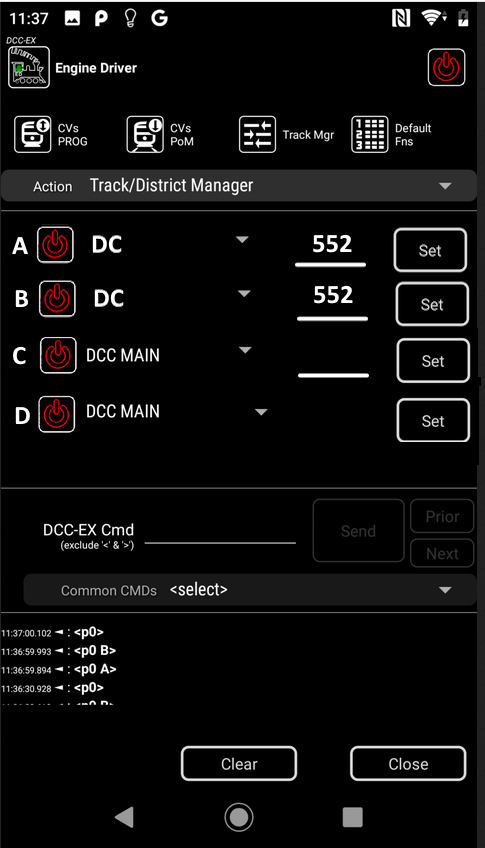


..... sets track output/districts A & B (above) to DC and uses 552 as the control number (could be any number) for those two districts and hits 'Set'. Then turns the track power on for A & B all with EngineDriver (ED) in less than a minute. He or the 552 engineer turns the track power on for the siding that 552 has been waiting in. He informs the engineer to select engine 552 with his throttle (phone, tablet or WiFi throttle). With the engine selected he can proceed out onto the main and go from district A to district B but hold for instructions before proceeding into district C which is currently a DCC district.
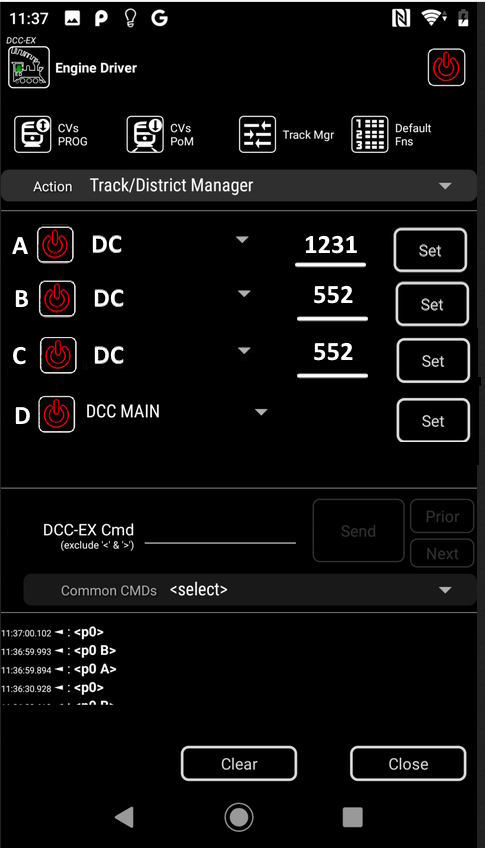
 

Once 552 is in district B the dispatcher (above) can set district C to DC and 552 can proceed into C and again hold there. He also asks for the road number of the second DC loco that has been waiting. It is 1231. He enters that and hits 'Set' and tells 1231 to select 1231 as his engine with his throttle and to proceed out onto the main and wait before entering district B.
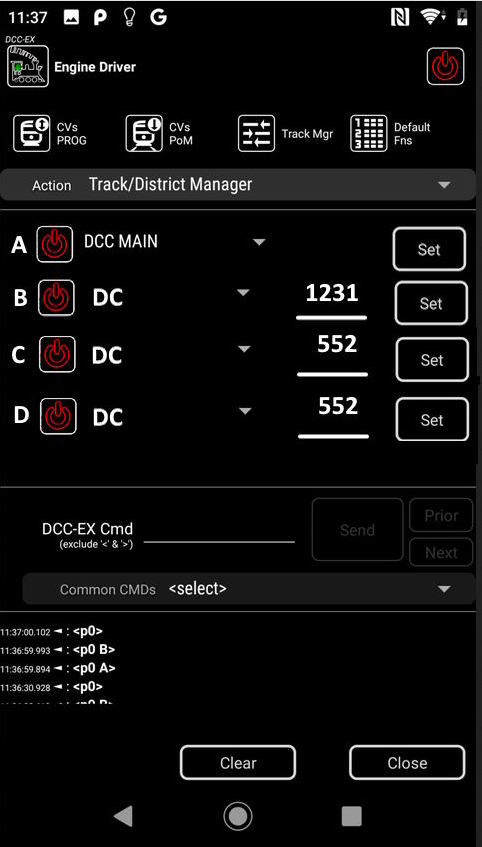
 

Above the dispatcher has set district D to DC for 552 and told him to proceed to D and hold. He had already set B to 1231 and 1231 has proceeded to B and will then be able to enter C once 552 clears and the dispatcher changes the control of C to 1231.

With A cleared of the two DC trains the dispatcher can change A to DCC and tell the DCC loco that he can turn on the track power for the siding he has been holding on and proceed into district A and hold there. Since he is DCC he enters his road number into his throttle and proceeds the dispatcher doesn't assign a number to DCC districts and if there is room any other DCC locos can enter A and go wherever they want in A.

Notice a huge advantage of the above over operating DC with block and cab control. The only electrical switches being turned on/off are those where engines are sitting in staging or on sidings where the power can be turned on/off. Also all operators can control their trains with wireless handheld throttles including the phone in their pocket.

The DCC-EX command station has WiFi built in and can be connected to JMRI but doesn't have to be. All of the above can be done with nothing other than the command station and the throttles since the command station can operate without JMRI using its native protocol. The throttles can connect directly to it. This is revolutionary for DC users.

NOTE: The above is a model that a club might use. A home layout can benefit from it the same way. Now you are the dispatcher doing all of the above with your phone or other throttle and controlling the engines with the same or another throttle at the same time. Have a visitor? They can run a train or two also.

Sumner
Working in N Scale ---Modeling UP from late 40's to early 70's very loosely......

Under$8.00 Servo turnout Control --- 3D Printed Model RR Objects -- My Home Page

http://1fatgmc.com/RailRoad/RR Main/Link Page Menu.html

peteski

  • Crew
  • *
  • Posts: 35313
  • Gender: Male
  • Honorary Resident Curmudgeon
  • Respect: +6656
    • Coming (not so) soon...
Re: DC/DCC Demo Using EngineDriver/TrackManager
« Reply #1 on: September 30, 2026, 01:20:44 PM »
0
Well, the 4 track outputs in the command station are basically 4 old style "blocks" with software controlled selection of power, instead of toggle switches and DC throttles on the old school block-based layouts.

What happens when a DC model on a DC powered block accidentally crosses over to DCC powered block, and vice-versa?
. . . 42 . . .

Sumner

  • Crew
  • *
  • Posts: 875
  • Gender: Male
  • Respect: +2456
    • My Home Pages....
Re: DC/DCC Demo Using EngineDriver/TrackManager
« Reply #2 on: September 30, 2026, 01:38:26 PM »
0
..............What happens when a DC model on a DC powered block accidentally crosses over to DCC powered block, and vice-versa?

I've test with my 8 block district with only two blocks connected and my 2 track output test layout.  I ran DC between them or DCC or both but never had that occur.  From what I hear there would be a short and the command station would shut the affected blocks down.  All track outputs are protected by the command station individually and you can set the trip current.  Maybe I'll give it a try later and purposely do that.

It might replicate 'old school' in some ways but they weren't/aren't controlling their trains with a wireless phone, tablet or WiThrottle WiFi throttles and as you said had to control everything with electric switches and a lot of wiring.  This is a huge advancement over that for those that can't or won't move to DCC because of huge numbers of DC locos and the expense of converting them.  It is saving me from having to convert 30-40 locos that I only want to run occasionally.

Sumner
Working in N Scale ---Modeling UP from late 40's to early 70's very loosely......

Under$8.00 Servo turnout Control --- 3D Printed Model RR Objects -- My Home Page

http://1fatgmc.com/RailRoad/RR Main/Link Page Menu.html

jagged ben

  • Crew
  • *
  • Posts: 3369
  • Respect: +589
Re: DC/DCC Demo Using EngineDriver/TrackManager
« Reply #3 on: October 01, 2026, 11:42:51 PM »
0
This is interesting.  Our club mostly runs DCC nowadays but still supports DC block control.  We would still be switching block power manually it we adopted this (at least for now) but the option to run DC off digital devices might be attractive to some members.  Also the DC cabs we're using are old and maintenance and replacements are an issue. 

Do the mutlple DC outputs support common rail wiring?

peteski

  • Crew
  • *
  • Posts: 35313
  • Gender: Male
  • Honorary Resident Curmudgeon
  • Respect: +6656
    • Coming (not so) soon...
Re: DC/DCC Demo Using EngineDriver/TrackManager
« Reply #4 on: October 02, 2026, 09:38:17 AM »
+1
This is interesting.  Our club mostly runs DCC nowadays but still supports DC block control.  We would still be switching block power manually it we adopted this (at least for now) but the option to run DC off digital devices might be attractive to some members.  Also the DC cabs we're using are old and maintenance and replacements are an issue. 

Do the mutlple DC outputs support common rail wiring?

That's a good  question.  I suspect that the variable DC output uses PWM to vary the voltage, and it is produced by the same H-Bridge transistors in the booster which produces the DCC voltage. That would mean that each rail is electrically active (not a ground). Also, all 4 boosters are also likely powered from single internal power source. If that is true then no common rail block wiring would be possible. This is just a guess on my part.
. . . 42 . . .

Sumner

  • Crew
  • *
  • Posts: 875
  • Gender: Male
  • Respect: +2456
    • My Home Pages....
Re: DC/DCC Demo Using EngineDriver/TrackManager
« Reply #5 on: October 02, 2026, 12:34:57 PM »
0
That is very close to what is going on with DCC-EX. There is one power supply for each two track outputs although you can run a single one with a Y power cable to the two motor Shields . Districts have to be isolated from each other but you can run from one District into another District without having to do anything.

I would think that if someone is using the dcc-ex command station for the DCC and DC there would be no reason to need common rail anymore.

Sumner
Working in N Scale ---Modeling UP from late 40's to early 70's very loosely......

Under$8.00 Servo turnout Control --- 3D Printed Model RR Objects -- My Home Page

http://1fatgmc.com/RailRoad/RR Main/Link Page Menu.html

peteski

  • Crew
  • *
  • Posts: 35313
  • Gender: Male
  • Honorary Resident Curmudgeon
  • Respect: +6656
    • Coming (not so) soon...
Re: DC/DCC Demo Using EngineDriver/TrackManager
« Reply #6 on: October 02, 2026, 03:53:33 PM »
+1
I would think that if someone is using the dcc-ex command station for the DCC and DC there would be no reason to need common rail anymore.

Unless one tries to do a most painless retrofit of an old block-style DC layout which was wired with common rail (only one side side of each block is gapped).
. . . 42 . . .

Sumner

  • Crew
  • *
  • Posts: 875
  • Gender: Male
  • Respect: +2456
    • My Home Pages....
Re: DC/DCC Demo Using EngineDriver/TrackManager
« Reply #7 on: October 02, 2026, 04:41:31 PM »
0
Right they just need to cut one rail to isolate the sections for dcc-ex. In DC or DCC mode.

Sumner
Working in N Scale ---Modeling UP from late 40's to early 70's very loosely......

Under$8.00 Servo turnout Control --- 3D Printed Model RR Objects -- My Home Page

http://1fatgmc.com/RailRoad/RR Main/Link Page Menu.html

peteski

  • Crew
  • *
  • Posts: 35313
  • Gender: Male
  • Honorary Resident Curmudgeon
  • Respect: +6656
    • Coming (not so) soon...
Re: DC/DCC Demo Using EngineDriver/TrackManager
« Reply #8 on: October 02, 2026, 05:26:30 PM »
0
Right they just need to cut one rail to isolate the sections for dcc-ex. In DC or DCC mode.

Sumner

Yes, and disconnect common bus wire from the rails, then add a separate feeder to the now dead rail for each block.
. . . 42 . . .

jagged ben

  • Crew
  • *
  • Posts: 3369
  • Respect: +589
Re: DC/DCC Demo Using EngineDriver/TrackManager
« Reply #9 on: October 03, 2026, 01:16:56 AM »
0
Unless one tries to do a most painless retrofit of an old block-style DC layout which was wired with common rail (only one side side of each block is gapped).

Yeah this is the thing.  We are not going to rewire hundreds of switches that only switch one rail.  (It has more to do with that than the rails not being gapped.)

Oh well, it was worth a thought for a minute.